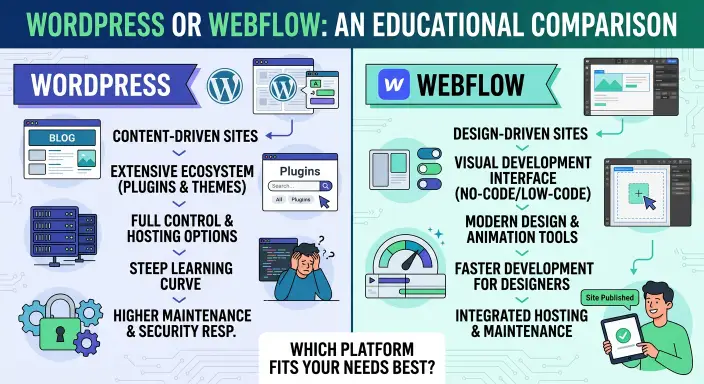
WordPress and Webflow are both website building platforms, but they serve different needs. WordPress offers more flexibility through themes and plugins, while Webflow focuses on visual design and an integrated website building experience. The better choice depends on your goals, budget, and technical skills.
Choosing between these platforms can be confusing, especially if you want to build a blog, business website, portfolio, or online store. Both can create professional websites, but they differ in how you build, manage, and maintain them.
WordPress is popular with bloggers, businesses, and website owners who want control over their content and features. Webflow appeals to designers and teams who want detailed visual control without writing much code.
In this guide, you will learn how the platforms compare in ease of use, design, , pricing, flexibility, and content management. You will also discover which platform may suit beginners, bloggers, and business owners best.
WordPress or Webflow: Quick Answer
Choose WordPress for flexibility, blogging, and a large plugin ecosystem. Choose Webflow for visual design control and managed website building.
Here is a quick comparison:
- WordPress: A flexible content management system with thousands of themes and plugins.
- Webflow: A visual website builder with a built in content management system and integrated hosting options.
- For blogging: WordPress is often a strong choice for content heavy websites.
- For design focused websites: Webflow is useful when detailed visual control is a priority.
- For : Both platforms can support strong search performance when configured and used well.
WordPress usually requires you to arrange hosting and manage updates if you use the self hosted version. Webflow handles much of the technical infrastructure for you through its hosted service.
Definition and Meaning
What Is WordPress?
WordPress is an open source content management system (CMS) that lets you create and manage websites. You can use it for blogs, business websites, portfolios, news sites, and online stores.
The self hosted version, available through WordPress.org, lets you choose your hosting provider and install themes and plugins to add features.
For example, you can use WordPress to:
- Publish blog posts and articles.
- Create pages for a business.
- Add contact forms and image galleries.
- Improve with suitable tools.
- Build an online store using WooCommerce.
WordPress offers considerable freedom, but you may need to manage updates, backups, security, and performance depending on your hosting setup.
What Is Webflow?
Webflow is a visual website building platform that combines design tools, content management, and hosting options. It allows users to build websites by arranging and styling elements visually.
Webflow is particularly useful for design focused websites, portfolios, landing pages, and business websites.
With Webflow, you can:
- Design pages using a visual editor.
- Control layouts, fonts, colors, and spacing.
- Create animations and interactive elements.
- Manage structured website content through its CMS.
- Publish websites using Webflow’s hosting service.
It reduces the need to write code for many design tasks, although advanced features may still require technical knowledge.
The Origin of WordPress and Webflow
The History of WordPress
WordPress launched in 2003 as a blogging platform. Over time, it developed into a flexible CMS that supports many kinds of websites.
Its open source model helped create a large community of developers, designers, and users. This community has contributed themes, plugins, tutorials, and support resources.
Today, WordPress can power everything from personal blogs to large content websites and online stores.
The History of Webflow
Webflow was founded in 2013 to make visual website design and development more accessible. Its tools allow users to create detailed layouts without manually writing every part of the code.
The platform has grown to include content management, hosting, responsive design tools, and features for building interactive websites.
Its main appeal is bringing visual design and website publishing together in one environment.
British English vs. American English
The names WordPress and Webflow are proper names, so their spelling does not change between British and American English.
| Feature | British English | American English |
| WordPress | WordPress | WordPress |
| Webflow | Webflow | Webflow |
| Website | Website | Website |
| Website builder | Website builder | Website builder |
| Main spelling difference | None | None |
When writing about either platform, keep the official brand spelling unchanged. Other words in your article may follow British or American spelling conventions, depending on your audience.
WordPress vs Webflow: Main Differences
1. Ease of Use
WordPress has a learning curve because users may need to choose hosting, install themes, configure plugins, and understand the dashboard. Once the site is set up, publishing articles and managing content can be straightforward.
Webflow provides a visual editor that lets users see how their design looks while building it. However, its layout and styling controls may take time to learn, especially for people new to web design.
Best choice: WordPress may suit people who mainly want to publish articles. Webflow may suit people who prefer visual design and are willing to learn its editor.
2. Design and Customization
WordPress uses themes, blocks, page builders, and custom code to control a website’s appearance. Many free and paid designs are available, and developers can customize the site when needed.
Webflow offers detailed visual control over layouts, typography, spacing, and interactions. This can be helpful when you want a custom design without writing every styling rule manually.
Best choice: Webflow is strong for detailed visual design. WordPress is strong for customization through its broad theme and plugin ecosystem.
3. Blogging and Content Management
WordPress began as a blogging platform, so publishing and organizing articles is one of its core strengths. It supports categories, tags, drafts, scheduled posts, and editorial workflows.
Webflow also includes a CMS for structured content such as blog posts, author profiles, and project collections. However, its content limits and plan features should be checked before choosing it for a large publishing operation.
Best choice: WordPress is often the practical option for large blogs and websites that publish content regularly.
4. Search Engine Optimization ( )
Both platforms can support good . Rankings depend on content quality, search intent, technical setup, site performance, and the overall experience for visitors.
WordPress offers plugins that can help manage titles, meta descriptions, XML sitemaps, schema markup, and redirects.
Webflow provides built in controls for important settings, including page titles, meta descriptions, canonical tags, and image alt text. Some advanced needs may require additional tools or custom work.
Best choice: WordPress offers a wide range of plugins and customization options. Webflow provides many essential controls in its visual environment.
5. Plugins and Integrations
WordPress has a large plugin ecosystem. You can add forms, tools, backup systems, membership features, online stores, and many other functions.
Webflow offers integrations, apps, and custom code options. Its built in tools may reduce the need for plugins, but some advanced features require external services.
Best choice: WordPress is generally better when you need a wide range of add ons and specialized functionality.
6. Hosting and Maintenance
With self hosted WordPress, you choose a hosting provider. Depending on your setup, you may be responsible for software updates, backups, security, and performance.
Webflow provides managed hosting for websites published through its hosted service. This reduces some technical tasks, although you still need to manage your content, design, account, and plan.
Best choice: Webflow may be more convenient if you want hosting and website building in one service. WordPress offers more choice over where and how your site is hosted.
When Should You Use WordPress?
Use WordPress for Blogs and Content Websites
WordPress is a strong option for websites that publish articles frequently. Its publishing tools, categories, tags, and plugins can support a growing content library.
It can be suitable for grammar websites, educational blogs, news sites, and other projects where written content is central.
Use WordPress for Flexible Business Websites
WordPress can support business websites that need contact forms, booking systems, memberships, or other specialized functions. Many features are available through plugins, although you should choose reliable tools and keep them updated.
Use WordPress for Greater Hosting Control
The self hosted version lets you choose your hosting provider and move your site between compatible hosts. This offers more control over your website infrastructure than a fully hosted platform.
Keep in mind that moving a site can still require technical work, especially if it uses specialized themes or plugins.
When Should You Use Webflow?
Use Webflow for Design Focused Websites
Webflow is useful when the appearance and layout of a website are major priorities. Its visual tools make it possible to create detailed designs and animations without manually writing all the CSS.
Use Webflow for Portfolios and Landing Pages
Designers, creative professionals, and businesses can use Webflow to build portfolios, campaign pages, and marketing websites.
Its visual editing tools can make it easier to adjust layouts and present a polished brand experience.
Use Webflow for Managed Hosting
Webflow can be convenient if you want the platform to manage hosting infrastructure as part of its service. This reduces some setup and maintenance work compared with managing a self hosted website.
However, you should review the available plans, CMS limits, and export options before committing to a long term project.
Common Mistakes When Choosing WordPress or Webflow
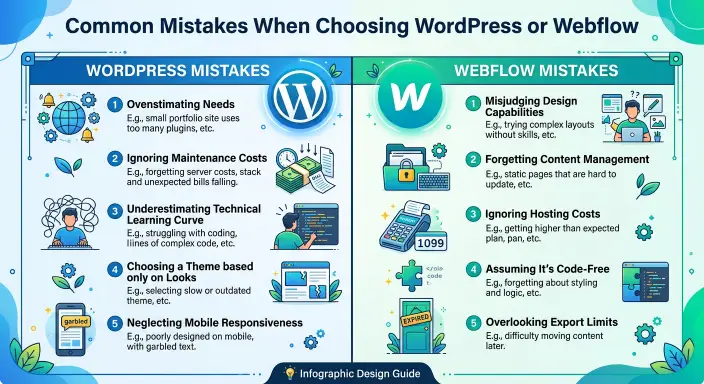
Mistake 1: Choosing Only by Appearance
A beautiful design does not automatically make a platform the best choice. Consider your publishing needs, budget, technical comfort, and future plans.
Mistake 2: Assuming WordPress Is Completely Free
The WordPress software from WordPress.org is free, but a live website may require paid hosting, a domain name, premium themes, or plugins.
Mistake 3: Assuming Webflow Requires No Learning
Webflow reduces the need for coding in many tasks, but its visual design tools can still take time to master.
Mistake 4: Thinking One Platform Always Ranks Better
Neither WordPress nor Webflow automatically guarantees better search rankings. Both need useful content, good technical , fast pages, and a positive user experience.
Mistake 5: Ignoring Future Costs and Limits
Review the full cost of hosting, subscriptions, extensions, and maintenance. If you plan to publish many articles or add complex features, check the platform’s limits before starting.
Everyday Examples: Webflow or WordPress?
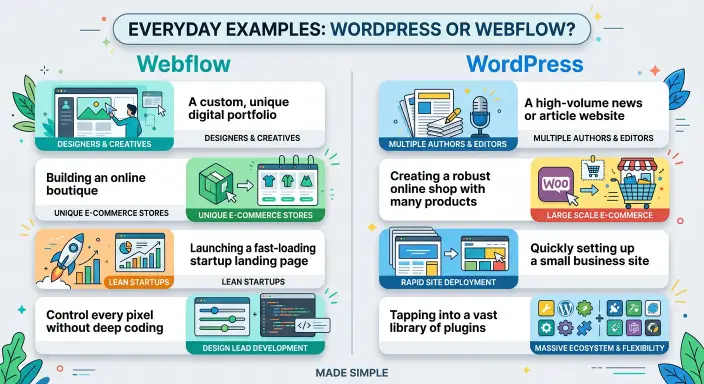
Example 1: A Grammar Blog
A writer wants to publish hundreds of grammar articles and organize them by topic.
Possible choice: WordPress, because its publishing system and plugin ecosystem are well suited to content heavy websites.
Example 2: A Designer’s Portfolio
A designer wants a custom portfolio with animations, project galleries, and carefully controlled layouts.
Possible choice: Webflow, because its visual design tools are useful for creating detailed layouts and interactions.
Example 3: A Small Business Website
A business needs a homepage, service pages, contact details, and a blog.
Possible choice: Either platform. WordPress may offer more flexibility, while Webflow may provide a more integrated design and hosting workflow.
Example 4: An Online Store
A business plans to sell products, manage orders, and add payment and shipping features.
Possible choice: WordPress with WooCommerce may be suitable for extensive customization. Webflow also supports e commerce, but you should compare its current store features and costs with your requirements.
WordPress vs. Webflow: Comparison Table
| Feature | WordPress | Webflow |
| Platform type | Open source CMS | Visual website builder and CMS |
| Ease of use | Depends on setup and tools | Visual, but has a learning curve |
| Design control | Themes, blocks, builders, and code | Detailed visual controls |
| Blogging | Excellent for content heavy sites | Supports CMS based blogs |
| Extensive plugin options | Built in controls | |
| Extensions | Large plugin ecosystem | Apps, integrations, and custom code |
| Hosting | Choose your provider with self hosted WordPress | Managed hosting available |
| Maintenance | Depends on hosting and setup | Less infrastructure maintenance |
| Portability | More hosting flexibility | Some parts may need rebuilding if moved |
| Pricing | Software is free; other costs vary | Free starting options and paid plans |
| Best fit | Blogs and flexible websites | Design focused websites |
A Simple Trick to Remember the Difference
Use this easy rule:
- WordPress = flexibility and content publishing.
- Webflow = visual design and an integrated workflow.
If your main goal is to publish and manage many articles, WordPress is often a good starting point. If your main goal is to create a highly designed website with visual tools, Webflow may suit you better.
Neither platform is right for every project. Choose based on what you need to build and maintain.
FAQs About WordPress or Webflow
1. Is WordPress better than Webflow?
WordPress may be better for content heavy websites, flexible functionality, and hosting choice. Webflow may be better for people who prioritize detailed visual design and managed hosting. The right choice depends on the project.
2. Is Webflow easier than WordPress?
Webflow offers a visual editor, but its design controls can take time to learn. WordPress may be easier for routine article publishing once it is set up. Ease of use depends on your experience and goals.
3. Which is better for , WordPress or Webflow?
Both can support strong . WordPress offers many plugins, while Webflow provides built in controls. Content quality, technical setup, and user experience matter more than the platform alone.
4. Is WordPress free to use?
The self hosted WordPress software is free, but you usually pay for a domain and hosting. Optional themes, plugins, and professional services can add to the cost.
5. Is Webflow free?
Webflow offers a free Starter option with limitations. Connecting a custom domain and using additional features generally requires a paid plan. Check its current pricing before choosing a plan.
6. Which platform is better for blogging?
WordPress is often a strong choice for blogs that publish many articles or need extensive publishing tools. Webflow also supports blogging through its CMS, so the best option depends on your content needs and plan limits.
7. Can beginners build a website with WordPress or Webflow?
Yes. Beginners can use either platform. WordPress requires some setup decisions, while Webflow requires learning its visual design tools. Templates and tutorials can help with both.
8. Which platform is better for an online store?
WordPress with WooCommerce offers extensive store customization. Webflow supports e commerce too, but features and costs vary. Compare payment, inventory, shipping, and order management needs before deciding.
9. Can I move my website from Webflow to WordPress?
Yes, but migration may require exporting available content and rebuilding parts of the design and functionality in WordPress. Check export limitations and plan the migration carefully before making a switch.
10. Which platform should I choose for a small business website?
Choose WordPress if you want flexibility and a broad range of extensions. Choose Webflow if you prioritize visual design and an integrated hosting workflow. Both can work well for a small business.
Conclusion
WordPress and Webflow are both capable website building platforms, but they offer different advantages. WordPress is a flexible choice for bloggers, content creators, and businesses that need many extensions and control over hosting. Webflow is especially useful for designers and teams that want detailed visual control and a more integrated publishing experience.
For blogs with large article libraries, WordPress is often a practical starting point. For portfolios, landing pages, and design focused business websites, Webflow may be a better fit. Both can support , but good rankings depend on useful content, technical setup, performance, and the needs of your audience.
Before choosing, consider your budget, the features you need today, and how you expect the website to grow. Check current plan details and limitations rather than deciding on price alone.
The best platform is the one that helps you build, manage, and improve your website without making your work harder than it needs to be.
Discover More Articles!
HTML Tutorial: A Simple Guide to HTML for Beginners(2026)
Poison Tree Tattoo Meaning: What It Symbolizes
Latter or Later: Which One Is Correct?(2026)

Ethan Parker is an English-language writer known for his interest in words, language, and clear communication. His work focuses on making everyday English easier to understand through simple explanations and practical examples.