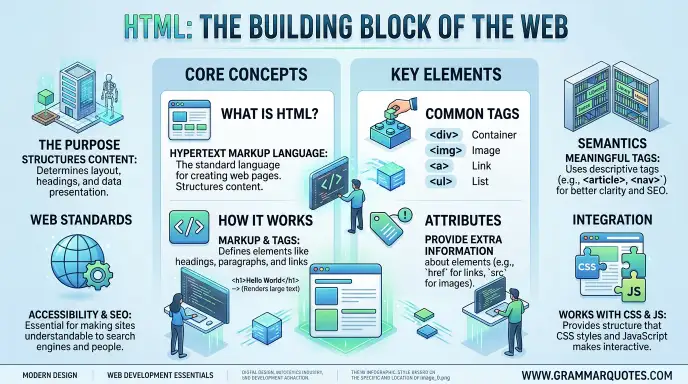
HTML is the standard language used to create and structure content on web pages. If you are new to web development, an HTML tutorial is one of the best places to start because HTML teaches you how websites are built from the basic level.
HTML stands for HyperText Markup Language. It tells a web browser what different parts of a page are, such as headings, paragraphs, images, links, lists, tables, and forms.
You do not need to be an expert programmer to learn HTML. A basic text editor and a web browser are enough to start. You can write HTML code, save it as an .html file, and open it in a browser.
This guide explains HTML in simple English. You will learn what HTML is, how it works, its basic structure, common tags, attributes, examples, mistakes, and useful tips for beginners.
HTML Tutorial : Quick Answer
An HTML tutorial teaches you how to create the structure of a web page using HTML elements and tags.
HTML is not a programming language. It is a markup language used to organize content on the web.
A basic HTML document looks like this:
<!DOCTYPE html>
<html>
<head>
<title>My First Page</title>
</head>
<body>
<h1>Hello World</h1>
<p>This is my first web page.</p>
</body>
</html>
When you open this file in a web browser, the browser displays the heading and paragraph as a web page.
What Is HTML Used For?
HTML can be used to create:
- Headings
- Paragraphs
- Links
- Images
- Lists
- Tables
- Forms
- Buttons
- Audio and video
- Page sections
- Website content
A simple rule is easy to remember:
HTML creates the structure, CSS controls the appearance, and JavaScript adds behavior.
What Is HTML?
HTML means HyperText Markup Language.
The name has three important parts:
HyperText
HyperText allows documents to connect to other documents through links.
For example:
<a href=”https://example.com”>Visit Example</a>
The link allows a user to move from one page to another.
Markup
Markup uses elements to describe the meaning and structure of content.
For example:
<h1>My Website</h1>
The <h1> element tells the browser that the text is a main heading.
Language
HTML has a defined set of elements, attributes, and rules that browsers understand.
So, HTML is a markup language for structuring content on the web.
The Origin of HTML
HTML was created by Tim Berners Lee while working at CERN.
The early version was designed to help researchers share and connect documents through the emerging World Wide Web.
HTML continued to develop over time.
Different versions introduced new features and improved the way websites could represent content.
Today, HTML5 is widely associated with modern HTML development, although the current HTML standard is maintained as a continuously updated web standard rather than as a series of numbered versions.
Why Was HTML Created?
The main idea was simple: documents should be able to contain links to other documents.
This idea became an important part of the World Wide Web.
JavaScript vs CSS vs HTML
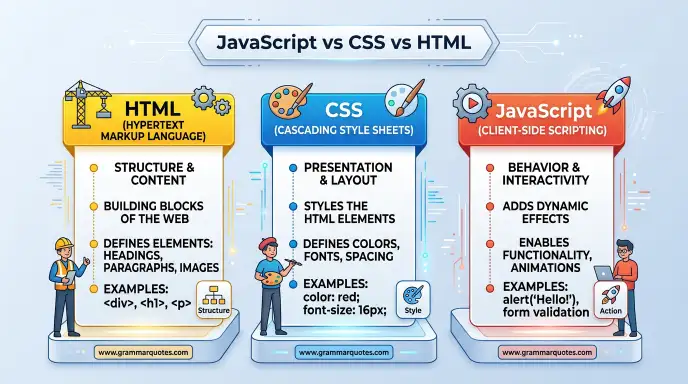
Beginners often ask if HTML, CSS, and JavaScript are the same thing.
They are not.
| Technology | Main Purpose |
| HTML | Structure and content |
| CSS | Design and presentation |
| JavaScript | Behavior and interaction |
Think about a house.
HTML is the structure of the house.
CSS is the paint, layout, colors, and decoration.
JavaScript is the system that makes things respond to actions.
Modern websites often use all three technologies together.
Basic HTML Structure
Understanding the basic structure is one of the first steps in an HTML tutorial.
<!DOCTYPE html>
<html>
<head>
<title>My Website</title>
</head>
<body>
<h1>Welcome</h1>
<p>This is my website.</p>
</body>
</html>
<!DOCTYPE html>
This declaration tells the browser that the document uses modern HTML.
<html>
This is the root element of the document.
<head>
The head contains information about the document that is not normally displayed as page content.
<title>
The title appears in the browser tab and can also be important for search engines.
<body>
The body contains the visible content of the web page.
Common HTML Tags
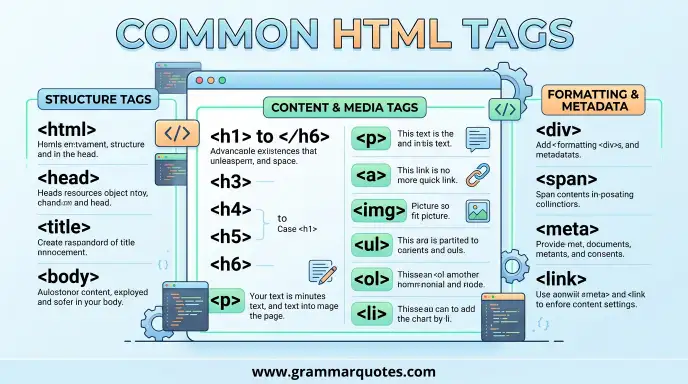
HTML uses elements to structure content.
Here are some common examples:
| HTML Element | Purpose |
| <h1> | Main heading |
| <h2> | Section heading |
| <p> | Paragraph |
| <a> | Link |
| <img> | Image |
| <ul> | Unordered list |
| <ol> | Ordered list |
| <li> | List item |
| <table> | Table |
| <form> | Form |
| <button> | Button |
| <div> | General container |
| <span> | Inline container |
Heading Example
<h1>My HTML Tutorial</h1>
<h2>HTML Basics</h2>
<h3>HTML Tags</h3>
Use headings in a logical order. This helps readers, browsers, assistive technologies, and search engines understand the page structure.
HTML Elements and Tags
A common beginner question is: What is the difference between an HTML tag and an HTML element?
A tag is part of the syntax used to create an element.
For example:
<p>Hello World</p>
Here:
- <p> is the opening tag.
- Hello World is the content.
- </p> is the closing tag.
- The complete structure is a paragraph element.
Some elements do not use a separate closing tag.
For example:
<img src=”photo.jpg” alt=”A photo”>
HTML Attributes
Attributes provide extra information about an HTML element.
For example:
<a href=”https://example.com”>Visit Website</a>
Here, href is an attribute.
Another example is:
<img src=”cat.jpg” alt=”A cat”>
The src attribute tells the browser where the image is located.
The alt attribute provides alternative text for the image.
Common Attributes
Some frequently used attributes include:
- href
- src
- alt
- id
- class
- title
- style
- name
- value
Creating Links in HTML
Links are an important part of the web.
You can create a link with the <a> element.
<a href=”https://example.com”>Read More</a>
The text between the opening and closing tags becomes clickable.
Internal Links
You can also link to another page on your own website:
<a href=”about.html”>About Us</a>
This is useful when building multi page websites.
Adding Images
Images can be added with the <img> element.
<img src=”flower.jpg” alt=”A red flower”>
The src attribute identifies the image file.
The alt attribute describes the image.
Good alternative text can improve accessibility and helps users when an image cannot be displayed.
HTML Lists
HTML supports different types of lists.
Unordered List
<ul>
<li>HTML</li>
<li>CSS</li>
<li>JavaScript</li>
</ul>
This creates a bullet list.
Ordered List
<ol>
<li>Learn CSS</li>
<li>Learn JavaScript</li>
</ol>
This creates a numbered list.
Lists are useful for menus, instructions, features, and many other types of content.
HTML Tables
Tables organize information into rows and columns.
Example:
<table>
<tr>
<th>Name</th>
<th>Age</th>
</tr>
<tr>
<td>Ali</td>
<td>20</td>
</tr>
</table>
Here:
- <table> creates the table.
- <tr> creates a row.
- <th> creates a heading cell.
- <td> creates a normal data cell.
Use tables for tabular data rather than for controlling the overall layout of a web page.
HTML Forms
Forms allow websites to collect information from users.
A simple form can look like this:
<form>
<label for=”name”>Name:</label>
<input type=”text” id=”name”>
<button type=”submit”>Submit</button>
</form>
Forms are commonly used for:
- Contact pages
- Login pages
- Registration
- Search boxes
- Surveys
- Online applications
HTML provides the structure of a form. Server side code or JavaScript is normally needed to process the submitted information.
Semantic HTML
Modern HTML includes semantic elements that describe the meaning of different sections.
Examples include:
<header>
<nav>
<main>
<section>
<article>
<aside>
<footer>
These elements can make a page easier to understand and maintain.
They can also improve accessibility because assistive technologies can use the document structure to help users navigate content.
Example
<header>
<h1>My Website</h1>
</header>
<main>
<article>
<h2>My First Article</h2>
<p>This is the article content.</p>
</article>
</main>
<footer>
<p>Copyright 2026</p>
</footer>
HTML Tutorial for Beginners: A Simple First Project
If you are completely new to HTML, start with a small project.
Create a file called:
index.html
Then add:
<!DOCTYPE html>
<html>
<head>
<title>My First Website</title>
</head>
<body>
<h1>Welcome to My Website</h1>
<p>Hello! I am learning HTML.</p>
<h2>My Hobbies</h2>
<ul>
<li>Reading</li>
<li>Sports</li>
<li>Technology</li>
</ul>
<a href=”https://example.com”>Visit Website</a>
</body>
</html>
Save the file and open it in a browser.
You have now created a basic web page.
Common HTML Mistakes
Beginners often make small mistakes while learning.
1. Forgetting Closing Tags
Incorrect:
<p>Hello
Better:
<p>Hello</p>
2. Using the Wrong Nesting
Incorrect:
<p><strong>Hello</p></strong>
Correct:
<p><strong>Hello</strong></p>
3. Missing Image Alt Text
Instead of:
<img src=”photo.jpg”>
Use:
<img src=”photo.jpg” alt=”Description of the photo”>
4. Using HTML for Styling Everything
HTML should describe structure and meaning.
CSS is generally the better tool for visual styling.
5. Using Headings Only for Size
Do not choose <h2> simply because its text looks smaller or larger.
Use headings according to the document hierarchy.
HTML and
HTML plays an important role in technical because search engines need to understand the structure and meaning of a web page.
Important HTML elements can include:
- <title>
- <meta>
- <h1>
- <h2>
- <a>
- <img>
- <main>
- <article>
- <nav>
A clear HTML structure can make content easier for search engines and users to understand.
For example:
<h1>HTML Tutorial for Beginners</h1>
This clearly identifies the main topic of the page.
Good HTML alone does not guarantee high Google rankings. Content quality, relevance, technical performance, links, user experience, and many other factors also matter.
HTML Tutorial : Google Trends & Usage
HTML remains one of the foundational technologies of the web.
Search interest for terms such as HTML tutorial, HTML basics, and learn HTML comes from students, new developers, website owners, designers, and people starting web development.
The topic also appears in searches related to:
- HTML tutorial for beginners
- HTML examples
- HTML tags
- HTML coding
- HTML5
- web development
- frontend development
- CSS and JavaScript
Interest can change over time as new learning resources and web development technologies appear, but HTML continues to be a core web technology.
HTML Tutorial: Related Questions People Ask
What is HTML used for?
HTML is used to structure content on web pages, including headings, text, images, links, lists, forms, and other content.
Is HTML easy to learn?
Yes. HTML is generally considered beginner friendly because its basic syntax is relatively simple.
Is HTML a programming language?
No. HTML is a markup language. Programming languages such as JavaScript, Python, and C++ are used to create logic and program behavior.
What should I learn after HTML?
CSS is a natural next step because it teaches you how to style and lay out HTML content. JavaScript can then add more interactive behavior.
Can I learn HTML without coding experience?
Yes. You can start HTML without previous programming knowledge.
What is HTML5?
HTML5 is commonly used to refer to the modern HTML standard and the features introduced during the HTML5 era.
What are HTML tags?
HTML tags are pieces of syntax used to create and structure HTML elements.
How long does it take to learn HTML?
The basic syntax can be learned fairly quickly, but becoming comfortable with HTML requires regular practice and building real pages.
Can HTML create a complete website?
HTML can create the structure and content of a website. CSS is normally used for styling, while JavaScript and server side technologies can provide additional functionality.
Where can I practice HTML?
You can practice by creating .html files on your computer and opening them in a browser. Online code editors can also be used.
HTML5 vs HTML
| Feature | HTML | HTML5 |
| Meaning | HyperText Markup Language | Modern HTML standard/HTML5 era |
| Purpose | Structure web content | Structure modern web content |
| Semantic elements | Supported | Strongly emphasized |
| Multimedia | Historically relied more on plugins | Native audio and video support |
| Modern web development | Essential | Commonly associated with modern HTML |
It is worth remembering that modern HTML is now maintained as a living standard rather than simply being treated as a fixed numbered version.
Frequently Asked Questions
What does HTML stand for?
HTML stands for HyperText Markup Language.
What is the main purpose of HTML?
Its main purpose is to structure content on web pages.
Is HTML difficult for beginners?
No. The basic concepts are relatively easy to understand, especially when you practice with small projects.
Do I need software to learn HTML?
You need a text editor and a web browser. Many free editors are available.
Is HTML important for web development?
Yes. HTML is a fundamental technology used to structure web content.
Should I learn CSS after HTML?
Yes. CSS is commonly learned after HTML because it controls the visual presentation of HTML content.
Can I get a web development job with only HTML?
HTML is an important foundation, but most web development roles require additional skills such as CSS, JavaScript, frameworks, version control, or backend technologies.
HTML Tutorial: Final Guide
HyperText Markup Language is one of the best technologies to learn when starting web development. It gives you the foundation needed to understand how web pages are structured.
Start with basic elements such as headings, paragraphs, links, images, and lists. Then move to tables, forms, semantic elements, and accessibility. After that, learn CSS to improve the design and JavaScript to add interaction.
You do not need to memorize every HTML element. Learn the common ones first and practice by creating small pages.
The most effective way to learn is to write code yourself. Create a simple page, change the content, add links, insert images, and experiment with different elements.
Once the basics become comfortable, build small projects such as a personal profile page, a simple blog page, or a product page.
HTML gives you the structure. CSS gives it style. JavaScript gives it behavior. Together, these technologies form an important foundation for modern front end development.
Conclusion
An HTML tutorial is a useful starting point for anyone who wants to learn web development. HTML is the standard markup language used to structure content on web pages.
The basic concepts are simple. You can begin with headings, paragraphs, links, images, lists, and forms. Once you understand these elements, you can move toward semantic HTML, accessibility, , CSS, and JavaScript.
HTML itself does not provide all the features needed for a modern website. Instead, it works with other web technologies to create complete web experiences.
The best way to learn is through practice. Create small pages, inspect existing websites, experiment with different elements, and gradually build larger projects.
If you are a complete beginner, do not worry about learning everything at once. Start with the basic structure and common elements. With regular practice, HTML can become a strong foundation for your web development journey.
Discover More Articles!
Flea or Lice: Key Differences, Meaning, and How to Tell Them Apart
Orthopedics or Orthopaedics: Which Spelling Is Correct?(2026)
Bollard or Ballard: Which Spelling Is Correct?(2026)

Ethan Parker is an English-language writer known for his interest in words, language, and clear communication. His work focuses on making everyday English easier to understand through simple explanations and practical examples.