Choosing between DLSS or FSR can be confusing, especially when a game offers several upscaling options.
Both technologies can increase FPS by rendering a game at a lower internal resolution and reconstructing the image for a higher output resolution. However, they work differently and support different hardware.
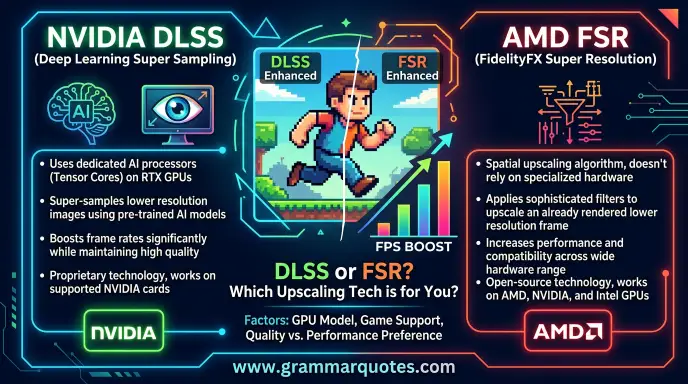
DLSS is NVIDIA’s AI powered rendering technology for GeForce RTX graphics cards. Its Super Resolution feature uses AI to create a higher resolution image from a lower resolution input. NVIDIA has also expanded DLSS with features such as Frame Generation, Ray Reconstruction, and Multi Frame Generation.
FSR, or AMD FidelityFX Super Resolution, is AMD’s family of upscaling and frame generation technologies. It has historically focused on broad hardware support, and AMD describes FSR as a cross platform solution that can work across a wide range of graphics hardware. Current AMD FSR technologies also include ML based features on newer Radeon GPUs.
So, which should you choose? The answer depends on your GPU, the game, the FSR or DLSS version available, image quality, and the FPS you need. This guide explains the differences in simple terms.
DLSS or FSR : Quick Answer
DLSS stands for Deep Learning Super Sampling. It is NVIDIA’s neural rendering technology. DLSS Super Resolution uses AI to reconstruct a higher resolution image from a lower resolution input, helping improve performance while maintaining image quality.
FSR stands for FidelityFX Super Resolution. It is AMD’s family of upscaling technologies. AMD’s current FSR technologies include upscaling and frame generation features, with newer ML powered features available on newer Radeon hardware.
In simple terms
- DLSS: NVIDIA’s AI based solution.
- FSR: AMD’s broader, cross platform solution.
- DLSS: Designed around GeForce RTX hardware.
- FSR: Designed for broad hardware compatibility.
- Both: Can increase gaming performance in supported games.
- Neither: Is automatically best in every game.
For example, if you own a compatible RTX GPU and a game has good DLSS support, DLSS may give you excellent image quality with a useful FPS increase.
If you have an AMD Radeon GPU, FSR may be the natural choice when the game supports it.
What Does DLSS or FSR Mean?
DLSS and FSR are upscaling technologies.
Normally, if you play a game at 4K, the GPU has to render a large number of pixels. This can be demanding, especially when you enable ray tracing and other demanding graphics settings.
An upscaler changes this process.
Instead of rendering every frame at the full output resolution, the game can render internally at a lower resolution. The upscaling technology then reconstructs the image for the target resolution.
For example, a game displayed at 4K may use an internal rendering resolution below native 4K. The upscaler then produces the final image shown on the screen.
This can reduce the GPU workload and increase FPS.
DLSS Super Resolution
NVIDIA says DLSS Super Resolution uses multiple lower resolution images, motion information, and information from previous frames to construct a higher quality image. Newer versions use transformer based AI models.
FSR Upscaling
AMD’s FSR technology reconstructs higher quality visuals from lower resolution frames. AMD’s current FSR family includes different generations and features, with FSR “Redstone” adding ML powered technologies for supported newer Radeon hardware.
Why do gamers use them?
The main reason is simple:
More performance without simply lowering every graphics setting.
Upscaling can be especially useful when playing at 1440p or 4K, where native rendering can require much more GPU power.
The Origin of DLSS or FSR
DLSS and FSR were developed by NVIDIA and AMD as different approaches to the same broad problem: modern games can be extremely demanding at high resolutions.
NVIDIA introduced DLSS as part of its RTX ecosystem and built it around AI powered image reconstruction. DLSS later expanded beyond Super Resolution. NVIDIA now describes DLSS as a suite that includes Super Resolution, Frame Generation, Ray Reconstruction, DLAA, and newer Multi Frame Generation features.
AMD developed FidelityFX Super Resolution with a strong focus on broad hardware compatibility. Earlier FSR generations used non ML approaches, while newer AMD technologies have introduced machine learning based upscaling on supported Radeon hardware.
This history is important because “DLSS vs FSR” is not a comparison between two single technologies anymore. Both families have changed over time.
A comparison between DLSS 4.5 and an older FSR version, for example, is not the same as comparing the latest available implementations.
British English vs American English
There is no British versus American spelling issue with DLSS or FSR.
These are technology names and acronyms. The important difference is the product or technology being discussed, not regional spelling.
| Term | British English | American English | Example |
| DLSS | DLSS | DLSS | Enable DLSS in the game settings. |
| FSR | FSR | FSR | The game supports FSR. |
| NVIDIA | NVIDIA | NVIDIA | NVIDIA develops DLSS. |
| AMD | AMD | AMD | AMD develops FSR. |
| Upscaling | Upscaling | Upscaling | Upscaling can improve performance. |
| Frame Generation | Frame Generation | Frame Generation | Frame Generation can increase displayed FPS. |
For international gaming content, the same terminology can be used.
Which Version Should You Use?
The best choice depends mainly on your hardware and the implementation available in your game.
NVIDIA GeForce RTX Users
If you have a supported GeForce RTX GPU, DLSS is usually the first option worth testing when the game supports it well.
NVIDIA’s current DLSS technology includes Super Resolution and several other neural rendering features. DLSS 4.5 Super Resolution uses a second generation transformer model and is available across GeForce RTX GPUs, while some newer Multi Frame Generation features have more specific hardware requirements.
Do not assume every DLSS feature works on every RTX generation. Always check the game’s requirements and the particular DLSS feature.
AMD Radeon Users
For AMD Radeon users, FSR can be an important option when supported by the game.
AMD says FSR technologies are available across supported generations and can also work with some non AMD graphics hardware, depending on the specific FSR version and game.
Intel or Other Supported Hardware
FSR’s broad design can make it useful on hardware outside AMD’s own GPUs when a particular game supports it.
However, compatibility varies by FSR version. Do not assume that every FSR feature works on every GPU.
Laptop Gaming
Laptop users should compare actual performance rather than choosing based only on the GPU brand.
Thermal limits, power limits, CPU performance, and the laptop’s display resolution can all affect the result.
1440p and 4K Gaming
Upscaling often becomes more useful as resolution increases.
At 4K, reducing the internal rendering workload can provide a meaningful performance benefit. At 1080p, aggressive upscaling can be more noticeable because the source image is already relatively small.
Competitive Gaming
If you play competitive games, look beyond the FPS counter.
Input latency, frame pacing, clarity, and responsiveness matter too. Frame Generation can increase displayed frame rates, but generated frames do not mean the game engine is processing input at the same rate.
Common Mistakes
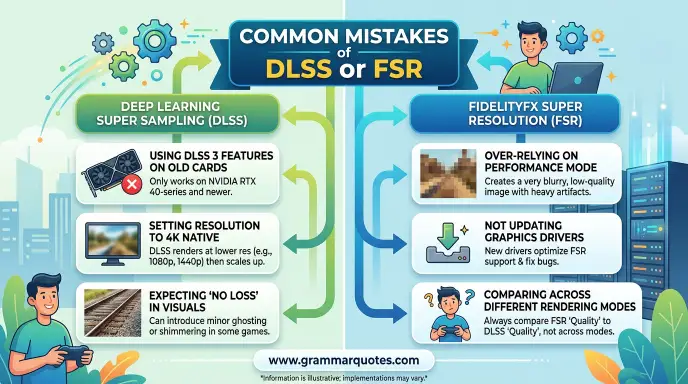
Mistake 1: Saying DLSS Always Beats FSR
Incorrect:
DLSS is always better than FSR.
Better:
DLSS often has strong image quality results on supported RTX hardware, but the better choice depends on the game and implementation.
Why?
Upscaling quality can vary between games, versions, resolutions, and presets.
Memory tip: Compare the actual game implementation, not only the brand name.
Mistake 2: Saying FSR Only Works on AMD GPUs
Incorrect:
FSR only works with AMD graphics cards.
Correct:
FSR is designed for broad hardware support, although compatibility depends on the specific version and game.
AMD describes FSR as cross platform and says it can support a broad range of graphics products.
Mistake 3: Treating Frame Generation as Normal Upscaling
Incorrect:
Frame Generation is the same thing as upscaling.
Correct:
Upscaling reconstructs a higher resolution image, while Frame Generation creates additional frames between rendered frames.
They are related but different technologies.
Mistake 4: Comparing Different Generations
Comparing the newest DLSS implementation against an old version of FSR can produce a misleading conclusion.
The reverse is also true.
Always identify the version being tested.
Mistake 5: Looking Only at FPS
A higher FPS number does not automatically mean a better gaming experience.
Look at:
- Image quality
- Input latency
- Frame pacing
- Ghosting
- Motion clarity
- Hardware compatibility
- Native resolution
- Game implementation
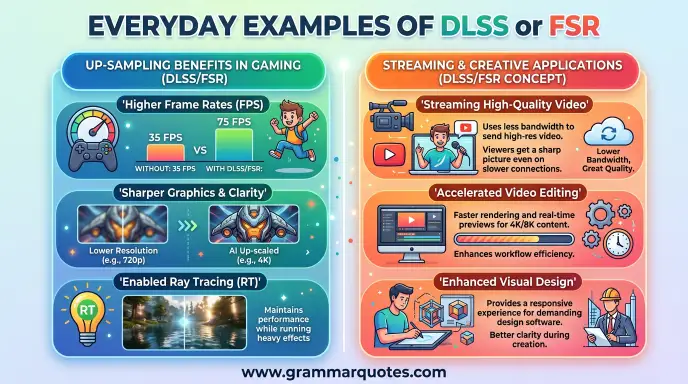
Everyday Examples
Emails
My laptop supports DLSS, so I can use it in supported games.
Does this game support FSR?
Business Writing
The latest GPU supports advanced AI rendering features.
News Headlines
NVIDIA expands DLSS features for supported GeForce RTX GPUs.
AMD expands its FSR technology with newer ML powered features.
Blogs
DLSS or FSR can help improve performance when native rendering is too demanding.
Social Media
DLSS or FSR: Which one gives you better results?
Academic or Technical Writing
Upscaling technologies can reduce the rendering workload by reconstructing output images from lower resolution inputs.
Daily Conversation
Should I use DLSS or FSR in this game?
Try both and compare image quality and performance.
Google Trends & Modern Usage
People search for “DLSS or FSR” because choosing an upscaling option is no longer a simple GPU brand decision.
The question can refer to several different comparisons:
- DLSS vs FSR image quality
- DLSS vs FSR FPS
- DLSS vs FSR at 1440p
- DLSS vs FSR at 4K
- DLSS vs FSR Frame Generation
- DLSS vs FSR on different GPUs
- DLSS vs FSR for ray tracing
Modern usage also makes the comparison more complicated because both technologies have multiple generations.
NVIDIA’s current DLSS family includes Super Resolution, Frame Generation, Ray Reconstruction, and newer Multi Frame Generation features.
AMD’s current FSR family includes upscaling and frame generation technologies, while its newer “Redstone” suite adds ML powered features on newer Radeon GPUs. AMD also notes that FSR 4 has been renamed FSR Upscaling as part of the broader Redstone naming structure.
Exact popularity by country should not be assumed without current search volume data. Search interest also changes when major games, GPUs, or new versions are released.
The most useful question is therefore not simply “Which brand is better?”
It is:
“Which technology gives my GPU and this particular game the best balance of image quality, performance, and latency?”
Quick Comparison Table
| Version | Meaning | Correct? | Region | Example |
| DLSS | NVIDIA neural rendering technology | Yes | Global | Use DLSS on a supported RTX GPU. |
| FSR | AMD FidelityFX Super Resolution | Yes | Global | Use FSR in a supported game. |
| DLSS Super Resolution | AI based upscaling | Yes | Global | DLSS reconstructs a higher resolution image. |
| FSR Upscaling | AMD upscaling technology | Yes | Global | FSR Upscaling can improve performance. |
| DLSS Frame Generation | Generates additional frames | Yes | Global | Supported DLSS Frame Generation can increase displayed FPS. |
| FSR Frame Generation | Generates additional frames | Yes | Global | Supported FSR versions can provide Frame Generation. |
DLSS vs FSR: Strengths and Weaknesses
| Feature | DLSS | FSR |
| Developer | NVIDIA | AMD |
| Main purpose | Upscaling and neural rendering | Upscaling and frame generation technologies |
| AI/ML approach | Central to modern DLSS | Depends on FSR generation and feature |
| Hardware focus | GeForce RTX | Broad hardware support |
| Game integration | Required for many features | Required for game integrated FSR |
| Frame Generation | Available on supported hardware | Available in supported FSR versions |
| Ray Reconstruction | Available | Not the same technology |
| Cross platform focus | More hardware specific | Strong cross platform focus |
| Best starting point | Supported RTX systems | Broad range of supported systems |
| Universal winner? | No | No |
AMD specifically distinguishes game integrated FSR from Radeon Super Resolution. FSR requires game integration, while RSR is a driver based solution designed to work across many compatible games.
Key Takeaways
- DLSS is NVIDIA’s AI powered rendering technology.
- FSR is AMD’s family of upscaling and frame generation technologies.
- DLSS is designed around GeForce RTX hardware and modern neural rendering features.
- FSR has a strong focus on broad hardware compatibility.
- Neither technology is automatically the best in every game.
- The exact version matters when comparing DLSS and FSR.
- Image quality, FPS, latency, and game implementation all matter.
- Test the available options at your target resolution before choosing one.
FAQs
Is DLSS better than FSR?
There is no universal winner. DLSS can provide excellent image quality and advanced AI based features on supported RTX hardware. FSR can offer broader hardware compatibility. The result depends on the game, resolution, GPU, and specific technology version.
Should I use DLSS or FSR?
If you have a supported RTX GPU and the game offers good DLSS support, start by testing DLSS. If your hardware does not support the relevant DLSS feature, or the game offers a strong FSR implementation, test FSR instead. Compare image quality and performance at your normal gaming settings.
Does FSR work on NVIDIA GPUs?
Some FSR technologies can work on non AMD graphics hardware because AMD designed FSR with broad compatibility in mind. However, support depends on the particular FSR version and game. AMD notes that developers must integrate FSR into supported applications.
Does DLSS work on AMD GPUs?
DLSS is NVIDIA’s technology and is designed for supported GeForce RTX hardware. You should not expect DLSS features to work on AMD Radeon GPUs. If you use an AMD GPU, FSR is one of the main upscaling technologies to look for.
Does DLSS increase FPS?
Yes. DLSS Super Resolution is designed to boost performance by producing a higher resolution output from a lower resolution input. NVIDIA also offers Frame Generation and other features that can increase displayed frame rates on supported hardware.
Does FSR increase FPS?
Yes. FSR can increase performance by reducing the rendering workload and reconstructing the final image. AMD describes FSR as a technology designed to boost frame rates in supported games. The actual gain depends on the game, GPU, resolution, quality mode, and FSR version.
Is DLSS better for 1440p or 4K?
DLSS can be useful at both resolutions, but upscaling becomes particularly valuable when native rendering is expensive. At 4K, the performance benefit can be especially useful because the GPU has many more pixels to render. The best quality mode still depends on the game and GPU.
Is FSR good for 1080p gaming?
FSR can be useful at 1080p, especially when a game is demanding. However, aggressive upscaling at lower resolutions can make image quality differences easier to notice. If your GPU already delivers a comfortable native 1080p frame rate, native rendering may sometimes be preferable.
Does Frame Generation reduce input lag?
Frame Generation can increase the number of displayed frames, but generated frames are not the same as additional game engine simulation frames. This means a higher displayed FPS number does not automatically mean lower input latency. NVIDIA pairs its DLSS Frame Generation technology with Reflex on supported implementations to address responsiveness.
Should I use native resolution instead of DLSS or FSR?
Native resolution can provide the most direct rendering result, but it can also require more GPU power. If native performance is already high enough, you may prefer native rendering. If you need more FPS, DLSS or FSR can provide a useful performance quality tradeoff.
Conclusion
The DLSS or FSR debate does not have one answer that works for every gamer. Both technologies aim to improve performance by reducing the amount of work required for native resolution rendering, but they use different approaches and have different hardware support.
DLSS is NVIDIA’s neural rendering technology and is especially relevant to GeForce RTX users. Modern DLSS includes Super Resolution along with features such as Frame Generation and Ray Reconstruction. NVIDIA has continued expanding the technology with newer transformer models and Multi Frame Generation.
FSR is AMD’s broader FidelityFX Super Resolution family. Its strong point has traditionally been broad hardware support, and AMD’s newer FSR technologies now include ML powered features on supported Radeon hardware.
For an RTX owner, DLSS is usually the first option worth testing. For broader hardware compatibility, FSR can be very useful. But the final decision should always come from the actual game.
The best choice is not the technology with the biggest name. It is the option that gives your system the best balance of FPS, image quality, and responsiveness.
Try the available options in your game, compare them at your normal resolution, and choose the one that looks and feels best.
Discover More Articles!
i.e. vs e.g.: Meaning, Difference, and Correct Usage
Else’s or Elses: Common Mistakes and Examples(2026)
Perfume or Parfum: What’s the Difference?(2026)

Ethan Parker is an English-language writer known for his interest in words, language, and clear communication. His work focuses on making everyday English easier to understand through simple explanations and practical examples.