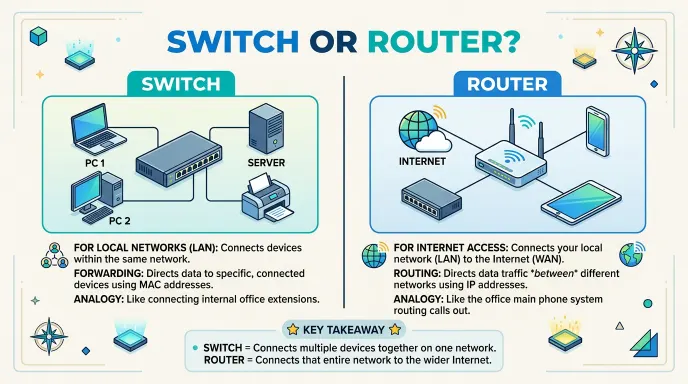
A router connects different networks and directs internet traffic, while a switch connects devices within the same local network. Both are important networking devices, but they perform different jobs.
People often confuse these two devices because both have Ethernet ports and are used to connect computers, phones, printers, servers, and other equipment. However, their roles in a network are not the same.
A router usually sits between your local network and another network, such as the internet. It decides where data should go and can provide features such as Wi Fi, IP address assignment, and basic network security.
A switch works mainly inside a local area network (LAN). It allows multiple wired devices to communicate with one another efficiently. For example, a business may use a switch to connect desktop computers, printers, cameras, and servers.
Understanding the difference can help you choose the right equipment for a home, office, school, or larger network. In this guide, we will explain what each device does, how they work together, their key differences, common mistakes, examples, and when you need one or both.
Switch or Router : Quick Answer
A router connects different networks, while a switch connects multiple devices within the same network.
The easiest way to remember the difference is:
Router = connects networks
Switch = connects devices
For example, your home router can connect your home network to the internet. If you have several wired computers in an office, a switch can connect those computers to the same local network.
Simple comparison
| Device | Main purpose |
| Router | Connects different networks |
| Switch | Connects devices on a local network |
In many homes and small offices, you may not need to buy both separately. A typical home router often includes several built in Ethernet ports that provide basic switching functionality.
Switch and Router : Definition and Meaning
What Is a Router?
A router is a networking device that forwards data between different networks.
In a typical home setup, the router connects your local devices to your internet service provider. It can also create and manage your home network.
Many modern routers include several features, such as:
- Wi Fi
- Ethernet ports
- DHCP
- Network address translation
- Basic firewall functions
- Guest networks
- Parental controls
The exact features depend on the model.
What Is a Switch?
A network switch connects multiple devices within a local network.
For example, an office might have:
- 10 computers
- 2 printers
- 1 server
- Network cameras
A switch can provide wired connections between these devices so they can communicate across the LAN.
Most modern Ethernet switches use MAC addresses to determine where frames should be forwarded.
People Also Ask: What is the main difference between a router and a switch?
A router connects different networks and directs traffic between them, while a switch connects devices within a local network.
How Does a Router Work?
A router receives network packets and determines where they should go.
Imagine your computer sends a request to a website. The router receives that traffic and forwards it toward the appropriate network.
In a home network, the basic path may look like this:
Computer → Router → Internet → Website
The response then travels back through the network toward your device.
A router uses IP addresses and routing information to make forwarding decisions.
Common router functions
A home router may:
- Connect your network to the internet
- Provide Wi Fi
- Assign local IP addresses
- Forward traffic
- Separate your local network from external networks
- Provide basic security features
This makes the router a central device in many home networks.
How Does a Switch Work?
A switch mainly operates inside a local network.
Suppose four computers are connected to an Ethernet switch. When one computer sends data to another, the switch uses information about connected devices to forward the traffic toward the appropriate port.
A simplified setup looks like:
Computer A → Switch → Computer B
The switch does not normally replace the internet facing role of a router.
What can a switch connect?
A switch can connect devices such as:
- Desktop computers
- Network printers
- Servers
- IP cameras
- Access points
- Network storage devices
- Other Ethernet equipment
People Also Ask: Can a switch connect to the internet?
A switch can help devices access the internet when it is connected to a router, but a basic switch does not normally replace the router’s role.
Router vs Switch: Key Differences
The biggest difference is the type of connection each device manages.
A router works between networks. A switch mainly works within one local network.
| Feature | Router | Switch |
| Main role | Connects networks | Connects local devices |
| Common address type | IP addresses | MAC addresses |
| Internet connection | Yes | Not normally by itself |
| Wi Fi | Often included | Usually not |
| DHCP | Common on home routers | Usually no |
| Connects LAN devices | Yes | Yes |
| Common home use | Very common | Sometimes needed |
| Common office use | Essential | Very common |
This table provides a simple overview, but advanced networking equipment can have overlapping features.
Do You Need a Switch or a Router?
The answer depends on what you are trying to build.
For a basic home network
You normally need a router.
A typical setup might include:
Internet connection → Router → Wi Fi and wired devices
If the router has enough Ethernet ports, you may not need a separate switch.
For many wired devices
A switch can be useful when you need more Ethernet connections.
For example:
Router → Switch → Multiple computers
The router provides the connection to the outside network, while the switch expands the number of wired devices that can connect to your LAN.
For a business network
Many businesses use both.
A larger network may look like:
Internet → Router/Firewall → Switches → Computers and other devices
The exact architecture depends on the size and requirements of the organization.
People Also Ask: Do I need both a router and a switch?
You may need both when you have multiple wired devices and need more Ethernet connections. A small home network may only require a router.
Can a Router Work as a Switch?
Yes, many home routers effectively include a small Ethernet switch.
If your router has four LAN Ethernet ports, those ports can often connect several wired devices to the same local network.
However, dedicated switches are useful when you need more ports or specific networking features.
Can a Switch Replace a Router?
A basic Ethernet switch generally cannot replace a router for a typical home internet connection.
A switch can connect devices on a local network, but it does not normally perform all the functions required to connect that network to the internet.
For example, a typical home setup requires functions such as routing, IP address management, and often network address translation.
Therefore:
Switch ≠ complete replacement for a router
A switch and router often work together rather than replacing one another.
Managed vs Unmanaged Switches
Not all switches are the same.
Unmanaged Switch
An unmanaged switch is usually simple to install.
You connect Ethernet cables, and the switch handles basic local traffic automatically.
These are common for:
- Homes
- Small offices
- Simple wired networks
Managed Switch
A managed switch provides more control.
Depending on the model, administrators may configure features such as:
- VLANs
- Traffic monitoring
- Port settings
- Quality of Service
- Security features
- Link aggregation
Managed switches are more common in business and professional environments.
Common Mistakes About Switches and Routers
Mistake 1: Thinking they are the same device
They can look similar, but their primary functions differ.
A router connects networks, while a switch mainly connects devices within a LAN.
Mistake 2: Buying a switch when a router is required
If you need to connect your home network to an internet service, a basic switch alone is usually not enough.
Mistake 3: Assuming every router needs a separate switch
Small networks often do not need one because many routers already have Ethernet ports.
Mistake 4: Thinking more Ethernet ports mean a better router
The number of ports is only one feature. Network speed, Wi Fi standards, processing capacity, security, and other specifications can also matter.
People Also Ask: Is a switch better than a router?
Neither is simply “better.” They perform different jobs. A router handles communication between networks, while a switch handles connections between devices on a LAN.
Switch or Router for Gaming?
For most home gaming setups, the router is the central networking device because it connects the home network to the internet.
A wired switch can be useful if several gaming devices need Ethernet connections.
For example:
Router → Switch → Gaming PC + Console + Other devices
A wired connection can provide a stable local network connection, but overall gaming performance also depends on your internet service, latency, Wi Fi conditions, server location, and network configuration.
Switch or Router for a Home Office
A home office may need only a router if there are just a few devices.
For example:
- Laptop
- Desktop
- Printer
- Phone
- Smart TV
If you have many wired devices, a switch can provide additional Ethernet ports.
A practical setup could be:
Internet → Router → Switch → Office devices
This arrangement keeps the router as the connection point between your home network and the internet while the switch expands the wired LAN.
Switch or Router for a Business
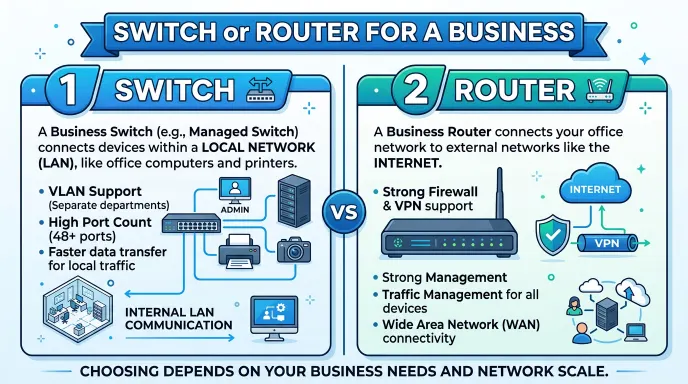
Businesses often use both types of devices.
A small office might have one router and one or more switches. Larger organizations may use multiple switches, routers, firewalls, wireless access points, and other networking equipment.
A simplified business network could look like:
Internet → Router/Firewall → Core or Distribution Switch → Access Switches → Devices
Professional networks can become much more complex, especially when they require VLANs, redundancy, security controls, monitoring, and high availability.
Router vs Switch: British and American English
There is no major British versus American spelling difference for router or switch.
Both British and American English use:
- router
- switch
- network switch
- wireless router
The technical meanings also remain broadly the same.
Therefore, you do not need to choose a different spelling based on your audience.
Router or Switch: Which One Should You Use?
Choose a router:
- Connect your local network to the internet
- Create a home network
- Provide Wi Fi
- Route traffic between networks
- Assign local IP addresses
Choose a Switch:
- Connect several wired devices
- Expand Ethernet ports
- Build a larger LAN
- Connect office computers and printers
- Add more wired devices behind an existing router
Switch, Router, and Modem: What Is the Difference?
A modem, router, and switch can all appear in the same network, but they have different roles.
Modem
A modem connects to the service provided by an internet provider using the technology used by that provider.
Router
A router manages traffic between networks and commonly creates the local home network.
Switch
A switch connects multiple wired devices within a local network.
A simple setup might look like:
Internet service → Modem/ONT → Router → Switch → Devices
Some internet providers and networking products combine several of these functions into one device.
People Also Ask: What comes first, the modem or router?
In a traditional setup, the modem or ONT connects to the service provider and then connects to the router. However, many modern devices combine multiple functions.
Switch or Router : Easy Memory Trick
Use this simple rule:
Router = Roads between networks
Think of a router as directing traffic between different networks.
Switch = Connections inside one network
Think of a switch as connecting devices within the same local network.
So remember:
Router → Network to network
Switch → Device to device
This is not a complete description of every advanced networking device, but it is an excellent starting point for beginners.
Router or Switch : Comparison Table
| Feature | Router | Switch |
| Connects different networks | Yes | Mainly no |
| Connects LAN devices | Yes | Yes |
| Uses IP routing | Yes | Not as its primary function |
| Uses MAC addresses | Yes | Yes |
| Provides Wi Fi | Often | Usually no |
| Provides DHCP | Common | Usually no |
| Expands Ethernet ports | Sometimes | Yes |
| Common in homes | Yes | Optional |
| Common in offices | Yes | Yes |
| Internet gateway | Yes | No, not normally |
Switch or Router : Google Trends and Usage
Search interest around switch or router often comes from people trying to understand networking equipment before setting up a home office, gaming network, school lab, or business LAN.
Beginners commonly search the phrase because both devices can have Ethernet ports and may look similar. The confusion is especially common when people are deciding if they need additional networking hardware.
The terms router, network switch, Ethernet switch, and home network are closely related, so search behavior can vary depending on the user’s exact problem.
For content, it is better to explain the underlying concept rather than repeatedly forcing the exact keyword into every paragraph. Natural variations such as router vs switch, network switch, Ethernet switch, LAN, and network device help make the article more useful and readable.
People Also Ask Questions About Switch or Router
1. What is the difference between a switch and a router?
A router connects different networks, while a switch mainly connects devices within the same local network.
2. Is a switch better than a router?
Neither is universally better. They perform different networking functions.
3. Can a switch connect to the internet?
A switch can connect devices to a router, which then provides internet access. A basic switch does not normally replace the router.
4. Do I need a router if I have a switch?
For a typical home internet connection, yes. A basic switch alone usually cannot perform all the functions of a router.
5. Can a router be used as a switch?
Many home routers include several LAN ports that can function as a basic Ethernet switch.
6. What is a network switch used for?
A network switch is used to connect multiple wired devices within a local network.
7. What does a router do?
A router forwards traffic between networks and commonly connects a local network to the internet.
8. Which is faster, a switch or router?
Speed depends on the specific hardware and network technology. They perform different roles, so speed alone is not a useful way to compare them.
9. Do I need both a switch and router?
You may need both if you want internet routing and more wired Ethernet connections.
10. What is the difference between a modem, router, and switch?
A modem or ONT connects to the internet service, a router manages traffic between networks, and a switch connects wired devices within a LAN.
Frequently Asked Questions
Is a router the same as a switch?
No. A router connects different networks, while a switch mainly connects devices within a local network.
Can I use a switch without a router?
Yes, a switch can create a simple local wired network between compatible devices. However, it normally cannot provide the full routing functions needed for a typical internet connection.
Can I connect a switch directly to a modem?
It depends on the type of internet service and equipment, but for a typical home network, connecting devices through a router is the normal approach.
Does a router have a built in switch?
Many home routers have multiple LAN Ethernet ports that provide basic switching functionality.
Is Wi Fi provided by a switch?
A traditional Ethernet switch does not normally provide Wi Fi. Wireless access points or wireless routers provide Wi Fi.
Which device should I buy for more Ethernet ports?
If you already have a functioning router and simply need more wired connections, an Ethernet switch is usually the appropriate type of device.
Can a switch improve internet speed?
A switch does not automatically increase your internet speed. Its main purpose is to connect devices on a local network and provide additional wired ports.
Final Comparison: Switch or Router
The difference between a switch and a router becomes much easier to understand when you focus on their main jobs.
A router connects different networks and commonly acts as the gateway between your local network and the internet. It can also provide Wi Fi, DHCP, routing, and other home network features.
A switch mainly connects multiple devices within the same local network. It is especially useful when you have several wired computers, printers, servers, cameras, or other Ethernet devices.
For a basic home setup, a router may be all you need because many home routers already include several Ethernet ports. If you need more wired connections, adding a switch can expand the network.
Larger homes, offices, schools, and businesses may use both devices together. The router handles communication between networks, while switches connect devices inside the LAN.
The easiest rule to remember is:
Router = connects networks.
Switch = connects devices within a network.
Once you understand this basic difference, choosing the right networking equipment becomes much simpler.
Discover More Articles!
Poll or Pole: Meaning, Difference, and Correct Usage
Sewed vs Sowed: Definitions, Examples, and Usage(2026)
Nineth or Ninth: Which Spelling Is Correct?(2026)

Ethan Parker is an English-language writer known for his interest in words, language, and clear communication. His work focuses on making everyday English easier to understand through simple explanations and practical examples.