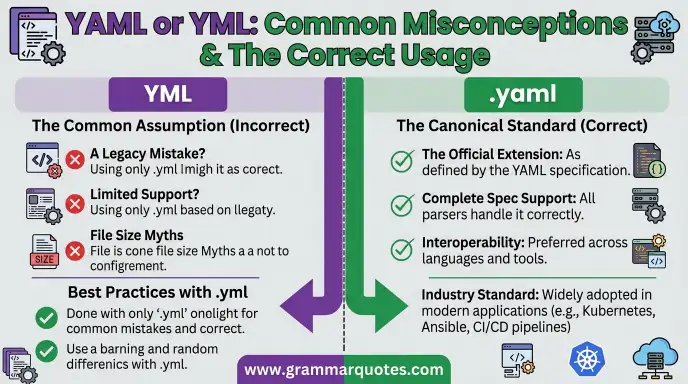
YAML and YML usually refer to the same file format, but they use different file extensions. YAML is a human readable data serialization language commonly used for configuration files, while .yaml and .yml are both widely used extensions for YAML files.
This can confuse beginners because you may see files named config.yaml in one project and config.yml in another. You may wonder if they use different syntax or if one is newer than the other.
The good news is simple: there is no major format difference between .yaml and .yml. Both can contain YAML data and are generally processed by the same YAML parsers.
The main difference is the filename extension.
In this guide, you will learn what YAML means, what YML means, where the format came from, if .yaml or .yml is better, how both extensions are used, common mistakes, and which one you should choose for your project.
YAML or YML : Quick Answer
YAML and YML normally refer to the same data format.
The difference is mainly the file extension:
| Extension | Example |
| .yaml | config.yaml |
| .yml | config.yml |
Both can represent YAML data.
For example, this content can be saved as either config.yaml or config.yml:
name: John
age: 25
city: London
The data itself does not change.
Is YAML or YML More Correct?
Both extensions are commonly used.
.yaml is the full extension and is often preferred because it clearly matches the name YAML.
.yml is shorter and became popular because older systems and conventions sometimes favored shorter file extensions.
The most important rule is consistency. If a project already uses .yml, it is usually better to follow that project’s convention.
What Is YAML?
YAML is a human readable format used to represent structured data.
The name originally stood for Yet Another Markup Language, but YAML was later explained as YAML Ain’t Markup Language to emphasize that it is designed for data rather than document markup.
A simple YAML example is:
name: Sarah
age: 22
student: true
The structure is easy for humans to read.
YAML is commonly used for:
- Configuration files
- Software settings
- Deployment files
- Automation
- Cloud configuration
- Data exchange
- DevOps tools
- CI/CD pipelines
YAML Definition
A simple YAML definition is:
YAML is a human readable data serialization format commonly used to represent structured information and configuration.
Unlike HTML, YAML is not designed to structure web pages. It is mainly used to describe data and settings.
What Does YML Mean?
YML usually refers to a YAML file that uses the .yml extension.
For example:
docker compose.yml
and:
docker compose.yaml
can both contain YAML syntax.
There is generally no separate YML language.
This is why the question “YAML or YML?” can be confusing. In most modern software contexts, YML is simply an alternative extension used for YAML files.
The Origin of YAML
YAML was created in the early 2000s by Clark Evans, together with contributions from other developers.
The format was designed to make structured data easier for humans to read and write.
Older data formats often used more complicated syntax.
YAML aimed to provide a clean format based heavily on indentation and simple key value structures.
The name originally expanded to Yet Another Markup Language.
Later, the official explanation became:
YAML Ain’t Markup Language.
This reflects the fact that YAML is mainly intended for data rather than document markup.
YAML vs YML: Main Difference
The biggest point to understand is that YAML and YML are not normally two different data formats.
They are usually the same format with different filename extensions.
| Feature | YAML | YML |
| Meaning | YAML format | Usually YAML format |
| Extension | .yaml | .yml |
| Syntax | YAML syntax | YAML syntax |
| Data format | Same | Same |
| Common use | Configuration | Configuration |
| Compatibility | Depends on the application | Depends on the application |
For example:
settings.yaml
and:
settings.yml
can contain the same YAML structure.
YAML or YML: Which Extension Should You Use?
If you are starting a new project, either extension can work if the software supports it.
However, .yaml has one simple advantage: it directly matches the name YAML.
For example:
config.yaml
is immediately recognizable as a YAML file.
But .yml is also extremely common:
config.yml
The Best Rule
Follow the convention of your project, tool, or team.
If the documentation says to create:
config.yml
use .yml.
If it expects:
config.yaml
use .yaml.
Do not switch extensions simply because one looks more correct.
Common Uses of YAML Files
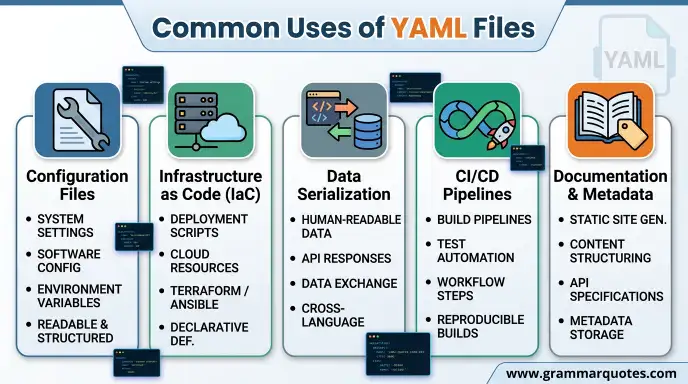
YAML is especially common in software development and DevOps.
Configuration Files
YAML can store application settings:
database:
host: localhost
port: 5432
name: myapp
GitHub Actions
GitHub Actions workflow files commonly use YAML.
For example:
name: Build
on:
push:
jobs:
build:
runs on: ubuntu latest
Docker Compose
Docker Compose configuration commonly uses YAML files.
A project may contain:
compose.yaml
or:
docker compose.yml
depending on the tool and project convention.
Kubernetes
Kubernetes resources are commonly described using YAML manifests.
For example:
apiVersion: v1
kind: Pod
metadata:
name: example
YAML Syntax Basics
Understanding basic syntax makes YAML easier to read.
Key Value Pairs
name: Ali
age: 20
Here, name and age are keys.
Their values are Ali and 20.
Lists
YAML uses a dash for list items:
languages:
HTML
CSS
JavaScript
Nested Data
Indentation creates structure:
user:
name: Ali
age: 20
location:
country: Pakistan
city: Lahore
Indentation is extremely important in YAML.
YAML or YML: Does the Syntax Change?
No.
Changing the extension from .yaml to .yml does not normally change the YAML syntax.
For example:
name: Ali
skills:
HTML
CSS
JavaScript
can be saved as:
skills.yaml
or:
skills.yml
The contents remain the same.
Common Mistakes with YAML and YML
Beginners can make several mistakes when working with these files.
1. Thinking YML Is a Different Language
.yml is generally just another extension for YAML.
2. Using Tabs for Indentation
YAML indentation should use spaces rather than tabs.
Incorrect indentation can cause parsing errors.
3. Mixing Indentation Levels
For example:
user:
name: Ali
age: 20
The indentation is inconsistent.
A better version is:
user:
name: Ali
age: 20
4. Forgetting Colons
YAML commonly uses a colon between a key and its value.
Correct:
name: Ali
5. Ignoring the Project Convention
If a project consistently uses .yml, changing everything to .yaml may create unnecessary confusion.
YML or YAML in Everyday Development
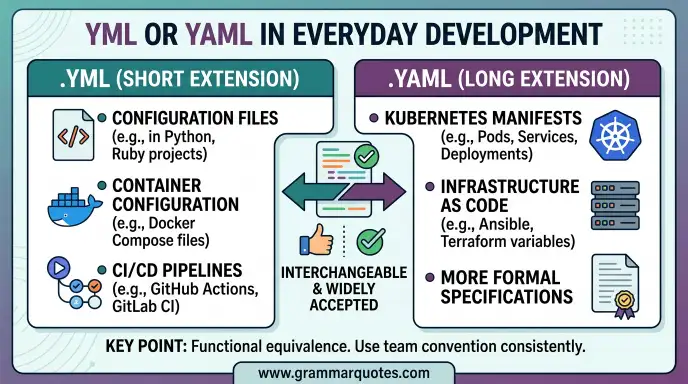
You may encounter both extensions in different situations.
GitHub
You may see workflow files using YAML extensions.
Docker
Container projects frequently use YAML configuration files.
Kubernetes
YAML manifests are widely used for describing resources.
CI/CD
Automation systems often use YAML to describe workflows.
Software Configuration
Applications can use YAML for settings and environment specific configuration.
This means understanding YAML can be useful even if you never write a large application.
YAML or YML for Beginners
If you are learning YAML for the first time, do not worry about choosing between the two extensions.
Learn the syntax first.
Focus on:
- Key value pairs
- Lists
- Indentation
- Nested objects
- Strings
- Numbers
- Boolean values
- Arrays
- Comments
- Multi line values
Once you understand these concepts, .yaml and .yml files will feel almost identical.
JSON vs YAML
YAML is often compared with JSON because both can represent structured data.
| Feature | YAML | JSON |
| Human readability | Very high | High |
| Comments | Supported | Not part of standard JSON |
| Indentation | Important | Not required for structure |
| Syntax | More flexible | More strict |
| Common use | Configuration | APIs and data exchange |
| File extension | .yaml / .yml | .json |
YAML can be easier for humans to write, especially for configuration files.
JSON can be useful when strict, machine readable data exchange is needed.
YAML or YML and
For most websites, YAML is not directly an ranking factor.
However, YAML can be part of the technical systems used to build, deploy, and manage websites.
For example, YAML may appear in:
- CI/CD workflows
- Deployment systems
- Static site generators
- Build tools
- Hosting configurations
- Development environments
This means YAML can support the technical infrastructure behind a website even though users normally do not see the YAML file itself.
YAML or YML : Google Trends & Usage
Searches around YAML, YML, and related terms usually come from developers and people working with configuration files.
Common search topics include:
- YAML syntax
- YAML tutorial
- YAML file
- YAML vs JSON
- .yaml vs .yml
- YML file
- YAML parser
- YAML configuration
- GitHub YAML
- Docker YAML
Interest in these terms is closely connected with software development, DevOps, cloud computing, automation, and modern development tools.
People Also Ask About YAML or YML
Is YAML and YML the same?
In most cases, yes. .yaml and .yml are different filename extensions commonly used for the same YAML format.
Is YML a programming language?
No. YML normally refers to a YAML file extension. YAML itself is a data serialization format, not a programming language.
Should I use YAML or YML?
Either can be appropriate. Follow the convention required by your software, project, or team.
Is .yaml better than .yml?
Not necessarily. .yaml is more closely aligned with the full name, while .yml is shorter and widely used.
Can I rename YML to YAML?
Usually, you can rename the extension if the application supports both forms. However, check the tool’s documentation before changing configuration files.
Is YAML easier than JSON?
Many developers find YAML easier to read and write because it uses indentation and less punctuation. The better choice depends on the project.
What does YAML stand for?
YAML originally stood for “Yet Another Markup Language.” It is now commonly explained as “YAML Ain’t Markup Language.”
Does YAML need indentation?
Yes. Indentation is an important part of YAML structure. Spaces should be used consistently.
Is YML valid YAML?
Yes, a file ending in .yml can contain valid YAML. The extension does not create a separate language.
YAML or YML Comparison Table
| Question | Answer |
| Are YAML and YML different formats? | Usually no |
| Is .yaml valid? | Yes |
| Is .yml valid? | Yes |
| Does the syntax change? | No |
| Is YAML a programming language? | No |
| Is YAML used for configuration? | Yes |
| Is YAML used in DevOps? | Yes |
| Is .yaml more descriptive? | Yes |
| Is .yml widely used? | Yes |
| Which should you choose? | Follow project conventions |
Frequently Asked Questions
What is the difference between YAML and YML?
The main difference is the filename extension. .yaml and .yml are commonly used for the same YAML format.
Which extension is officially preferred?
Both extensions widely encountered. The best choice depends on the project and software convention.
Can YAML replace JSON?
YAML can represent many types of structured data that JSON can represent, but they have different syntax and common use cases.
Is YAML difficult to learn?
The basics are relatively simple. The most important beginner concept is understanding indentation.
Why does Docker use YAML?
YAML provides a readable way to describe configuration, services, networks, volumes, and other settings.
Should beginners learn YAML?
Yes, especially if you interested in web development, DevOps, cloud computing, automation, or software configuration.
Final Guide: YAML or YML?
The answer to YAML or YML is simple: both extensions commonly used for YAML files.
The .yaml extension directly matches the name of the format, while .yml is a shorter and widely used alternative.
There is normally no difference in the actual YAML syntax. A file named config.yaml can contain the same type of data as config.yml.
If you are working on an existing project, follow its established convention. If the project documentation specifically asks for .yml, use .yml.
The most important thing is not the extension. It is learning how YAML works.
Focus on key value pairs, lists, nested structures, indentation, and proper syntax. These skills will help you work with tools such as GitHub Actions, Docker, Kubernetes, and other development systems.
Once you understand YAML, the difference between .yaml and .yml becomes very small.
Conclusion
YAML and YML generally refer to the same data format, with the main difference being the filename extension. Both .yaml and .yml are widely used for configuration and structured data.
YAML is popular because it is relatively easy for humans to read and write. It is used in software configuration, DevOps, automation, cloud computing, CI/CD workflows, Docker, Kubernetes, and many other development environments.
For beginners, the best approach is to learn YAML syntax rather than worry too much about the extension. Once you understand indentation, key value pairs, lists, and nested data, you can work with either type of file.
When choosing an extension, follow the convention of the project or tool you are using. Consistency is more important than choosing one extension over the other.
In short, .yaml and .yml are usually two names for the same thing. Learn the format, follow project conventions, and you will be able to work confidently with both.
Discover More Articles!
Inquiries or Enquiries: Which Spelling Is Correct?(2026)
Flea or Lice: Key Differences, Meaning, and How to Tell Them Apart
Bollard or Ballard: Which Spelling Is Correct?(2026)

Ethan Parker is an English-language writer known for his interest in words, language, and clear communication. His work focuses on making everyday English easier to understand through simple explanations and practical examples.