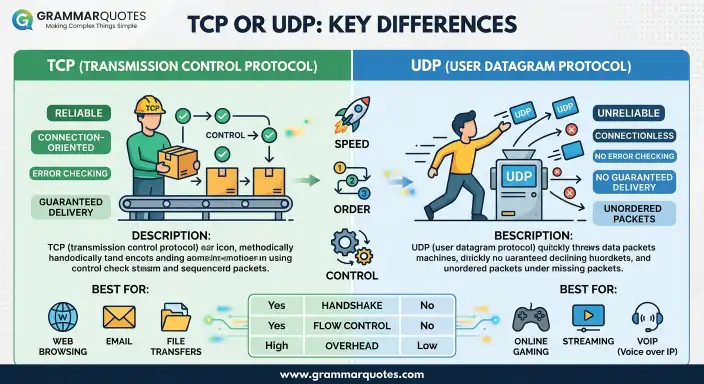
TCP stands for Transmission Control Protocol, while UDP stands for User Datagram Protocol. TCP focuses on reliable data delivery. It checks that data arrives correctly and in the proper order. UDP focuses on sending data quickly with less communication overhead. It does not guarantee delivery or order.
For example, TCP is commonly used when downloading files or loading websites because missing data can cause problems. UDP is often used for online gaming, live streaming, and voice calls, where speed and low delay are important.
In this guide, you will learn the meaning of TCP and UDP, how they work, their key differences, advantages, disadvantages, real world uses, and common mistakes. You will also find comparison tables and answers to frequently asked questions to help you understand these networking protocols.
Quick Answer: TCP vs UDP
TCP is a connection oriented transport protocol that provides reliable, ordered delivery of data. UDP is a connectionless transport protocol that sends data with less overhead but does not guarantee delivery or order.
| Feature | TCP | UDP |
| Full form | Transmission Control Protocol | User Datagram Protocol |
| Connection | Connection oriented | Connectionless |
| Reliability | Provides reliable delivery | Does not guarantee delivery |
| Data order | Preserves byte order | Does not guarantee order |
| Speed and overhead | Usually more overhead | Usually less overhead |
| Error handling | Detects errors and supports recovery | Detects errors but does not provide delivery recovery |
| Common uses | Web traffic, file transfers, email | Real time voice, gaming, live media |
| Data unit | Byte stream | Datagram |
| Protocol type | Transport layer | Transport layer |
Easy rule to remember: TCP prioritizes reliable, ordered delivery, while UDP provides a simpler way to send data with low overhead.
What Is TCP? Definition and Meaning
TCP stands for Transmission Control Protocol. It is a transport layer protocol that allows applications on different devices to exchange data reliably over an IP network.
TCP establishes a connection before normal data transfer begins. It uses acknowledgments, sequence numbers, retransmissions, and flow control to help ensure that data reaches the receiving application correctly and in order.
Examples of TCP
- Loading a website over HTTPS.
- Downloading a document from a server.
- Sending and receiving email using protocols that run over TCP.
- Transferring files between computers.
- Accessing a remote computer through SSH.
How Does TCP Work?
TCP generally follows these steps:
- Connection establishment: The devices establish a TCP connection, usually through a three way handshake.
- Data transmission: The sender divides the application data into segments and transmits them.
- Acknowledgments: The receiver acknowledges received data.
- Retransmission: If required data appears to be missing, TCP can retransmit it.
- Ordered delivery: TCP presents the received byte stream to the application in order.
TCP also uses flow control to avoid overwhelming the receiver and congestion control to respond to network congestion.
Advantages of TCP
- Reliable, ordered data delivery.
- Retransmission of missing data.
- Flow control and congestion control.
- Suitable for applications that need complete data.
- Widely supported by internet applications.
Disadvantages of TCP
- Additional communication and processing overhead.
- Connection setup can add delay.
- Retransmissions can increase latency.
- Ordered delivery may delay later data while missing earlier data is recovered.
What Is UDP? Definition and Meaning
UDP stands for User Datagram Protocol. It is a transport layer protocol that allows applications to send independent packets called datagrams without establishing a connection first.
UDP has a smaller, simpler protocol structure than TCP. It includes a checksum for error detection, but it does not guarantee that packets will arrive, arrive only once, or arrive in the correct order.
Applications that use UDP can implement their own reliability mechanisms when needed.
Examples of UDP
- Real time voice and video communication.
- Many online multiplayer games.
- DNS queries, in common configurations.
- Live media delivery.
- Network monitoring and other lightweight request response services.
How Does UDP Work?
UDP generally follows these steps:
- Datagram preparation: An application supplies data to UDP.
- Packet transmission: UDP adds a small header and passes the datagram to IP.
- Network delivery: The network attempts to deliver the datagram to the destination.
- Application processing: If the datagram arrives and passes relevant checks, the receiving application can process it.
Unlike TCP, UDP does not automatically retransmit missing datagrams or guarantee that they arrive in sequence.
Advantages of UDP
- Low protocol overhead.
- No connection handshake is required.
- Useful for applications sensitive to delay.
- Supports multicast in suitable network environments.
- Lets applications control their own timing and recovery strategies.
Disadvantages of UDP
- Datagrams can be lost.
- Datagrams can arrive out of order.
- Duplicate delivery is possible.
- Applications may need to implement reliability, congestion handling, or other safeguards.
- It is not automatically faster in every network situation.
Main Differences Between TCP and UDP
TCP and UDP both operate at the transport layer, but they serve different application needs.
1. Connection Oriented vs Connectionless
TCP establishes a connection before sending application data. UDP sends datagrams without a transport level connection handshake.
2. Reliability
TCP provides reliable, ordered delivery of a byte stream. UDP does not guarantee delivery, although an application can build reliability on top of it.
3. Speed and Latency
UDP has less built in protocol overhead and avoids TCP’s connection setup and retransmission requirements. This can help reduce delay. However, actual performance depends on the application, network, and protocol design.
4. Data Ordering
TCP delivers data to the application in sequence. UDP does not guarantee that datagrams arrive in the order in which they were sent.
5. Error Handling
Both protocols can detect certain transmission errors through checksums. TCP also supports acknowledgments and retransmissions. UDP does not automatically recover lost datagrams.
6. Header Size
TCP has a minimum header size of 20 bytes without options. A UDP header is 8 bytes. This is one reason UDP has lower protocol overhead.
TCP vs UDP: Comparison Table
| Characteristic | TCP | UDP |
| Full form | Transmission Control Protocol | User Datagram Protocol |
| OSI model association | Transport layer | Transport layer |
| Connection setup | Yes | No |
| Guaranteed delivery | Yes, while the connection can successfully deliver the data | No |
| Guaranteed order | Yes | No |
| Retransmission | Built in | Not built in |
| Flow control | Yes | No built in transport flow control |
| Congestion control | Yes | No built in transport congestion control |
| Minimum header | 20 bytes | 8 bytes |
| Data handling | Byte stream | Individual datagrams |
| Best suited for | Reliable transfer | Low overhead, delay sensitive communication |
| Example | HTTPS over TCP | DNS over UDP in common configurations |
TCP vs UDP: Which One Is Faster?
UDP often has lower overhead because it does not establish a connection or automatically retransmit lost datagrams. This can make it suitable for real time applications.
However, UDP is not always faster than TCP. Performance depends on network conditions, packet loss, congestion, application requirements, and the protocol used by the application.
For example, a live voice call may prefer timely audio over retransmitting an old packet. A file download, on the other hand, usually needs every part of the file to arrive correctly.
The best choice depends on what the application needs rather than speed alone.
When Should You Use TCP or UDP?
Use TCP When Reliability Matters
TCP is a good choice when an application needs data to arrive completely and in order.
Examples include:
- Downloading files.
- Loading many websites using HTTPS over TCP.
- Sending email through TCP based mail protocols.
- Transferring important documents.
- Accessing remote systems through SSH.
Use UDP When Low Delay and Simple Datagrams Matter
UDP can be a good choice when an application can tolerate some packet loss or has its own recovery system.
Examples include:
- Real time voice calls.
- Multiplayer games.
- Live audio and video applications.
- DNS queries in common configurations.
- Applications that need multicast communication.
Neither protocol is universally better. The application requirements determine the appropriate choice.
Real World Examples of TCP and UDP

TCP in Everyday Life
1. File downloads: TCP helps ensure that missing data is retransmitted so the resulting file can be complete.
2. Website access: HTTPS can use TCP to provide reliable delivery for web content. Modern web protocols may also use QUIC over UDP.
3. Email: Common email protocols, including SMTP and IMAP, traditionally use TCP.
4. Remote access: SSH commonly uses TCP to provide reliable communication between a client and a remote computer.
UDP in Everyday Life
1. Voice calls: Real time voice applications may use UDP because delayed audio can be less useful than receiving newer audio promptly.
2. Online gaming: Many games use UDP for time sensitive updates, although the exact networking design varies.
3. DNS: DNS commonly uses UDP for queries and responses, while TCP is also used in certain situations.
4. Live media: Some real time media systems use UDP based transport to reduce delay.
Remember that applications can use more than one transport protocol, depending on their functions and network requirements.
TCP and UDP in the OSI Model

TCP and UDP are transport layer protocols. In the five layer internet model, they belong to the transport layer, which sits between the application and internet layers.
| Layer | Example | Purpose |
| Application | HTTP, DNS, SMTP | Provides network services to applications |
| Transport | TCP, UDP | Supports communication between application processes |
| Internet | IP | Routes packets between networks |
| Link | Ethernet, Wi Fi | Transfers data across a local network link |
| Physical | Radio signals, electrical or optical signals | Carries bits through a physical medium |
The exact layer names differ between networking models, but TCP and UDP are commonly associated with the transport layer.
Common Mistakes About TCP and UDP
Mistake 1: Saying UDP Is Always Faster
UDP has lower protocol overhead, but that does not guarantee better performance in every situation.
Correct understanding: UDP can reduce delay for suitable applications, while actual speed depends on network and application conditions.
Mistake 2: Saying UDP Cannot Detect Errors
UDP includes a checksum to detect certain errors. However, it does not provide TCP style retransmission and reliable delivery.
Correct understanding: UDP can detect errors without guaranteeing recovery from lost or corrupted data.
Mistake 3: Saying TCP Is Used Only for Websites
TCP supports many services, including file transfers, email, remote access, and other applications.
Correct understanding: TCP is a general purpose transport protocol used wherever reliable, ordered delivery is required.
Mistake 4: Saying All Online Games Use UDP
Many games use UDP, but not all games use the same networking design. Some applications use TCP, and some use multiple protocols.
Correct understanding: Protocol choice depends on the game’s communication requirements.
Mistake 5: Saying UDP Is Unreliable for Every Purpose
UDP itself does not guarantee delivery, but applications can implement acknowledgments, retransmissions, and other reliability mechanisms.
Correct understanding: UDP provides a simple transport service; the application can add extra features when needed.
TCP vs UDP: Key Takeaways
- TCP means Transmission Control Protocol.
- UDP means User Datagram Protocol.
- Both operate at the transport layer.
- TCP provides reliable, ordered data delivery.
- UDP sends datagrams without guaranteeing delivery or order.
- TCP has more built in mechanisms and a larger minimum header.
- UDP has lower protocol overhead.
- TCP is commonly used for file transfers, email, and many web connections.
- UDP is commonly used for real time communication and some gaming applications.
- UDP is not always faster, and TCP is not always the best choice.
- The correct protocol depends on the application’s needs.
People Also Ask About TCP or UDP
1. What Is the Main Difference Between TCP and UDP?
TCP provides reliable, ordered delivery of data. UDP sends datagrams with less overhead but does not guarantee delivery or order.
2. Is TCP Faster Than UDP?
UDP often has lower overhead, but neither protocol is always faster. Network conditions and application requirements affect performance.
3. Is TCP More Reliable Than UDP?
Yes. TCP provides reliable, ordered delivery. UDP does not provide these guarantees by itself, although applications can add reliability mechanisms.
4. Is DNS TCP or UDP?
DNS commonly uses UDP for ordinary queries and responses. It can also use TCP, including for certain larger responses and zone transfers.
5. Do Online Games Use TCP or UDP?
Many online games use UDP for time sensitive updates because low delay matters. The exact protocol depends on the game.
6. What Are Examples of TCP and UDP?
TCP examples include many file transfers, email connections, and HTTPS connections. UDP examples include many real time voice systems, some games, and common DNS queries.
Frequently Asked Questions (FAQs)
What Does TCP Stand For?
TCP stands for Transmission Control Protocol. It provides reliable, ordered delivery of data between applications across IP networks.
What Does UDP Stand For?
UDP stands for User Datagram Protocol. It sends datagrams without establishing a transport level connection or guaranteeing delivery.
Which Is Better: TCP or UDP?
Neither is universally better. TCP is suitable when reliable, ordered data matters. UDP is useful when low overhead and timely delivery are priorities.
Does UDP Have a Handshake?
UDP does not require a transport level handshake before sending datagrams. An application may still establish its own session or perform additional exchanges.
Does TCP Guarantee That Data Will Arrive?
TCP is designed to provide reliable, ordered delivery. If a connection fails or cannot recover, an application may still receive an error instead of successful delivery.
Can TCP and UDP Use the Same Port Number?
Yes. TCP and UDP have separate port number spaces, so the same numerical port can be used by both protocols for different services.
Conclusion
TCP and UDP are two essential transport protocols that help applications communicate over computer networks. Although both carry data between applications, they are designed for different needs. TCP focuses on reliable, ordered delivery, making it useful for file transfers, email, and many website connections. UDP focuses on sending datagrams with low protocol overhead, making it useful for applications such as real time voice, multiplayer gaming, and some media services.
The most important difference is that TCP includes mechanisms such as acknowledgments and retransmissions to recover from lost data, while UDP does not guarantee delivery or packet order. UDP can be useful when low delay matters, but it is not automatically faster in every situation. Similarly, TCP may introduce additional overhead, but its reliability is valuable when missing data would cause problems.
If you are learning networking, remember this simple rule: choose TCP when reliable, ordered delivery is important, and consider UDP when an application needs low overhead and can handle missing or out of order datagrams. Understanding these differences will help you study computer networks, prepare for networking exams, and make better decisions when designing software.
Discover More Articles!
Color or Colour: Correct Spelling, Meaning, and Examples
Motorhome or RV: What Is the Difference?(2026)
Definitely or Definately: Correct Spelling, Meaning, and Examples

Ethan Parker is an English-language writer known for his interest in words, language, and clear communication. His work focuses on making everyday English easier to understand through simple explanations and practical examples.